Your rendering specialist is booked for two weeks. The CMF
review is Thursday. Marketing needs hero shots by Friday.
Sound familiar?
The product visualization market has split. One camp still
treats rendering as a specialist craft (desktop tools, solo
operators, queue-based output). The other is building for
teams. We spent time with all seven of the major options to
figure out which actually solves the workflow problem, and
which just makes pretty pictures.
How we tested
We ran the same workflow through each tool: import a CAD
assembly, assign materials, set up a scene, generate
variants, and share the result with a non-technical
stakeholder for feedback. We scored on:
✓ Time from
CAD file to first presentable render
✓ Can a product
manager give feedback without training?
Free tier / Team plans from $49/mo | Browser-based
Disclosure: This is us. We built Figurement because we
kept hitting the same wall with the tools below. We'll
be honest about what we do well and where we're still
catching up.
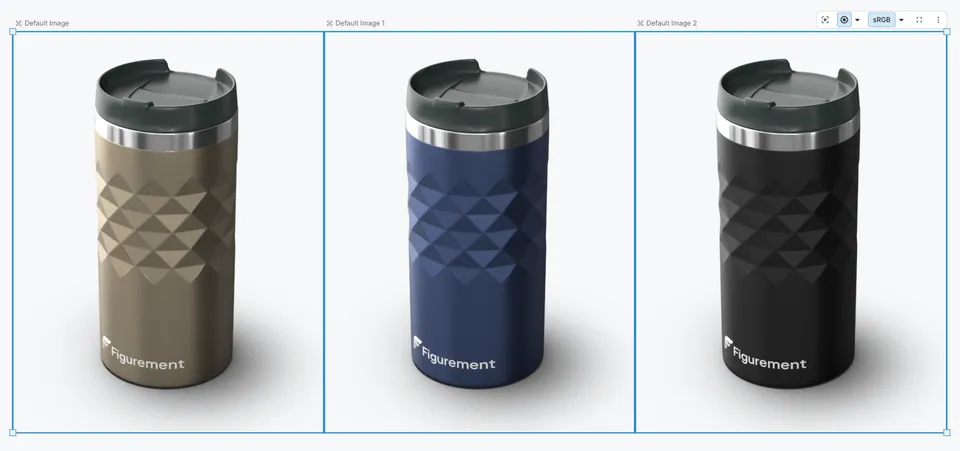
Variant comparison on Figurement's canvas. Your PM
can open this same view from a link.
Figurement is the only tool on this list where your product manager,
your buyer, and your designer can all be looking at the same
3D scene in real time, from a browser tab. No installs, no
viewer licenses, no "let me export a screenshot and Slack
it to you."
You drag in a STEP file (or FBX, Rhino, glTF, OBJ, STL,
3MF, DXF, or USD), the AI agent suggests materials and lighting, and you're
reviewing photorealistic variants within minutes. The
CMF workflow is native: build colorways, compare them
side by side, get sign-off in the same session.
Where it shines
Browser-native. Open a link, you're in. Works on any
machine
AI agent handles material assignment, lighting,
scene setup
Built-in CMF canvas with variant compare and
stakeholder approval
Share a review link with anyone. They don't need a
license or training
Real-time ray tracing for iteration, cloud path
tracing for final output
Where it's still growing
Material library is smaller than KeyShot's
(expanding fast, but honest)
No VR/AR review mode yet
Less mature plugin ecosystem compared to 20-year-old
desktop tools
Bottom line
If your problem is "only one person on the team can
produce or modify visuals," Figurement fixes that. If
your problem is "I need to render a 500-million-polygon
automotive scene in VR," look at VRED.
2. KeyShot — Best Desktop Renderer
$1,299/yr per seat (subscription only) | Windows, macOS
www.keyshot.com
If you have a dedicated rendering specialist and their
job is to produce polished final images, KeyShot is
still hard to beat. The drag-and-drop material workflow
is genuinely fast. You pull in a CAD file, throw
materials on it, hit render, and the progressive output
looks good almost immediately.
The problem is everything around the rendering. Your PM
can't open the file. Your buyer sees a JPEG export, not
the actual 3D. Want to compare four colorways? That's
four separate renders your specialist queues up. KeyShot
is a brilliant tool for one person. It's not built for a
team.
Strengths
Render quality is excellent, full stop
Material library is massive and well-organized
Live-links to Creo, SolidWorks, Rhino keep geometry
in sync
Animation timeline is surprisingly capable
The catch
Single-player tool. KeyShot Hub adds sharing but
it's a separate purchase and doesn't enable
real-time co-editing
Stakeholders see exported images. No interactive 3D
review
CMF decisions happen in PowerPoint or email, not in
the rendering tool
$1,299/yr per seat (perpetual licenses no longer
available), and everyone who touches the file needs
a license
Best fit
Solo visualization specialists or small studios where
one person owns the entire rendering pipeline. If the
output is "send final renders to stakeholders for
sign-off," KeyShot does that well.
Blender can do almost anything. Modeling, sculpting,
animation, VFX, compositing, video editing. Its Cycles
renderer is genuinely competitive with paid tools. And
it costs nothing.
The trade-off: it's a generalist suite that does
everything, which means it's not specifically optimized
for anything. There's no CMF workflow. No variant
management. No way to share a scene with a non-technical
reviewer. You'll spend time building your own pipeline
before you get productive output for product
visualization specifically.
Strengths
Free. Genuinely, completely free. No "free tier"
nonsense
Cycles path tracer produces renders that compete
with anything on this list
EEVEE gives you instant viewport feedback while
working
Massive community. If you get stuck, someone has
solved it
Python scripting means you can automate repetitive
tasks
The catch
Steep learning curve. Plan for weeks of ramp-up, not
hours
CAD import is clunky (requires add-ons or exporting
to intermediate formats)
No collaboration features whatsoever. It's a desktop
app for one person
You have to build your own product visualization
pipeline from scratch
Best fit
Teams with a 3D generalist who already knows Blender and
has the time to set up custom workflows. Or
budget-constrained teams willing to trade setup time for
zero software cost.
VRED is used in major automotive workflows, with public
examples including BMW, Kia, Škoda, and Rivian. If
you're visualizing a car interior with 47 leather grain
variations and need to review it in a VR CAVE, this is
the tool. It's absurdly powerful for automotive.
For everyone else? It's overbuilt and overpriced. The
learning curve is measured in months. You need dedicated
GPU workstations. The collaboration features exist but
they're enterprise-heavy. If you're a consumer goods
company looking at VRED, you're buying a Formula 1 car
to commute to work.
Strengths
Automotive material accuracy is unmatched (car
paint, chrome, leather grain)
VR and AR review built in
Deep Alias and CATIA integration for automotive
pipelines
Handles massive polygon counts without breaking a
sweat
The catch
~$16,000/year per seat. You're negotiating with
Autodesk sales, not clicking "buy"
Requires serious hardware and IT support
Steep learning curve even for experienced 3D artists
Completely overkill for consumer products,
packaging, or accessories
Best fit
Automotive OEMs and their tier-one suppliers. If you're
not rendering cars (or maybe heavy machinery), you don't
need this.
5. Adobe Substance 3D Stager — Best for Creative Teams
Already in Adobe
$59.99/mo individual / $119.99/mo per team license
(Substance 3D Collection) | Windows, macOS
www.adobe.com/products/substance3d-stager.html
Stager is Adobe's attempt to make "drag a 3D model into
a scene and render it" as easy as placing an image in
InDesign. If your creative team already lives in
Photoshop and Illustrator, the interface will feel
familiar. You can match lighting to a photo backdrop,
which is genuinely useful for marketing composites.
The problem: it's still a desktop app with no
collaboration story. And you're paying for the entire
Substance 3D suite ($59.99/mo, or $119.99/mo for team
licenses) even if you only use Stager. It supports many
CAD formats, though it may not match dedicated
CAD-rendering tools in workflow depth. No CMF workflows.
It's a staging tool, not a product development platform.
Strengths
Genuinely easy scene composition for people who
think in 2D layouts
Match-to-photo lighting is great for marketing shots
Adobe Stock 3D library has decent ready-made assets
Familiar interface if you're an Adobe person
The catch
No collaboration. Desktop-only, single user
CAD format support is weak compared to dedicated
tools
No variant management or CMF features
Bundled pricing means you pay for tools you might
not use
Render engine is less mature than KeyShot or Cycles
for complex scenes
Best fit
Creative/marketing teams producing product shots for
campaigns who already pay for Adobe Creative Cloud. Not
a fit for product development workflows.
$839/yr (billed annually) or $109/mo month-to-month |
Windows, macOS
www.maxon.net/en/cinema-4d
Cinema 4D has a reputation for being the friendliest
professional 3D app. That's fair. The interface is
cleaner than Blender's, the learning curve is gentler,
and with Redshift now included, you get a fast GPU
renderer out of the box. Motion graphics studios love it
because it handles animation as well as stills.
For product visualization specifically, though, it's a
general-purpose tool being used for a specific job.
There's no CMF workflow. No variant system. No way to
share a scene with stakeholders who don't have a C4D
license. You're paying $109/month for a full 3D suite
when you might only need the rendering portion.
Strengths
Most approachable interface of the professional
desktop 3D tools
Redshift GPU renderer is fast and the output looks
great
Strong modeling tools if you need to modify geometry
Rock-solid stability. Rarely crashes mid-project
The catch
$839/year (or $109/month) for visualization feels
expensive when that's all you need
No collaboration. Single-user desktop app
No product-specific workflows (CMF, variants,
stakeholder review)
CAD import is basic compared to KeyShot or
Figurement
Best fit
Studios and freelancers who do product visualization
alongside motion graphics, packaging design, or other 3D
work. If you need one tool for multiple disciplines and
you already know C4D, it works.
7. Unreal Engine — Best for Interactive Experiences
Free for small studios / $1,850/seat/yr for enterprise
visualization | Windows, macOS, Linux
www.unrealengine.com
Unreal is a game engine being used for product
visualization. And honestly? The visual quality from
Lumen and Nanite is jaw-dropping in real time. If you
need an interactive product configurator that runs in a
browser via Pixel Streaming, or a VR showroom
experience, Unreal can deliver things no other tool on
this list can match.
But you need a developer. Probably a team of them.
Setting up a product visualization pipeline in Unreal is
a software engineering project, not a "download and
start rendering" situation. There are no built-in CMF
workflows, no material libraries designed for product
teams, and no stakeholder review flow. You're building
all of that from scratch in C++ or Blueprints.
Strengths
Real-time quality that rivals offline renderers
(Lumen GI, Nanite geometry)
Free for companies under $1M revenue. Above that,
enterprise visualization requires $1,850/seat/year
(royalties apply to games and some runtime
applications licensed to third-party end users; many
visualization/internal uses fall under seat
licensing or royalty-free exceptions)
Pixel Streaming gives browser access to real-time
scenes
The catch
You need game-engine developers on staff. This is
not a design tool
Months of setup before you have a usable product
visualization pipeline
Hardware requirements are punishing (high-end GPU
workstations)
No product-team workflow features out of the box.
You build everything custom
Best fit
Companies building interactive product experiences (web
configurators, VR showrooms, digital twins) who have the
engineering resources to invest in a custom Unreal
pipeline. Not practical for teams who just need to
review and approve product visuals.
Depends on what's actually blocking you. Be honest about the
bottleneck:
"Multiple people need to be involved in visual
decisions" → Figurement
"I'm a solo rendering specialist and I want the
best output quality" → KeyShot ($1,299/yr)
"We have zero budget but someone who can learn 3D" → Blender
"We're an automotive OEM" → VRED
"Our creative team already pays for Adobe CC" → Substance 3D Stager
"We need one tool for motion graphics AND product
shots" → Cinema 4D
"We're building a custom interactive product
experience" → Unreal Engine
Here's what we've noticed talking to product teams: the
bottleneck is rarely render quality. Every tool on this
list can produce good-looking images. The bottleneck is
access. One specialist holds the keys. Everyone else
waits, reviews JPEGs in email, and gives feedback on the
wrong version.
That's a workflow problem, not a rendering problem. And
it's the specific problem we built Figurement to solve.
Try Figurement free
Drop in a CAD file, get a photorealistic scene in minutes,
share it with your team via link. No install, no credit
card.